Clients

Mudlet

Solar Eclipse sends a GMCP feed alongside the text — your vitals, your stats, your affects, your worth, the channels and where you are standing, as structured data rather than as lines to be scraped. solarUI is a Mudlet interface built on that feed: panels that update themselves because the server told them to, not because a trigger matched a string, and a painted map of the overworld with you standing on it.

Package What you get Before you install If something goes wrong Installing by hand

Package

One file, one click. Download it, open Package Manager → Install in Mudlet, pick the file, and restart the profile. The script, all fifteen of its event registrations, the painted map, the overworld atlas, the tile font and every sprite come with it, so none of the steps can be got half done.

Download solarUI 2.98

solarUI.mpackage — 21.5 MB, nearly all of it the painted map of Thera. It is a zip archive of four hundred and twenty-eight files: the Mudlet script and its manifest, the one hundred and twenty-nine painted pictures — the continent, the sea floor under it and the caves cut into it — the index that places them, the landmarks drawn sharper than the ground they stand on, the pieces that are laid over a square when a ceiling drops or a button is pressed, the overworld atlas, a starter map of the Solar Academy, the tile font, and the sixteen-pixel sprites that stand on it — you, a ship, a submarine, an airship, a coach and a ferry and a turtle, four facings apiece, your own silhouette for the tunnels, you ducking under a low ceiling, and the spans that lay over you when you pass beneath one — planking, brick, coping or a wall walk, whichever it is you are under. The script is plain Lua and nothing in it is compiled, so you can open the archive and read it before you install.

Use at your own risk

This is a community client script, not part of the game. It is offered as-is, with no warranty and no support promised. It changes how your Mudlet looks and behaves — it reserves part of your window, adds panels, and writes a border setting into your profile that survives a restart. It cannot touch your character, your equipment or anything on the server.

Install it into a profile you do not mind rearranging, and read if something goes wrong before you do. Nobody will restore a profile you have to rebuild.

Restart the profile after installing. Mudlet registers the tile font when it installs the package, and a font does not become available to a profile already running — so the map draws in spades and shading until the profile has been round once. That is one restart, not a fault.

What you get

The game text keeps the left half of the window. The right half becomes four panels.

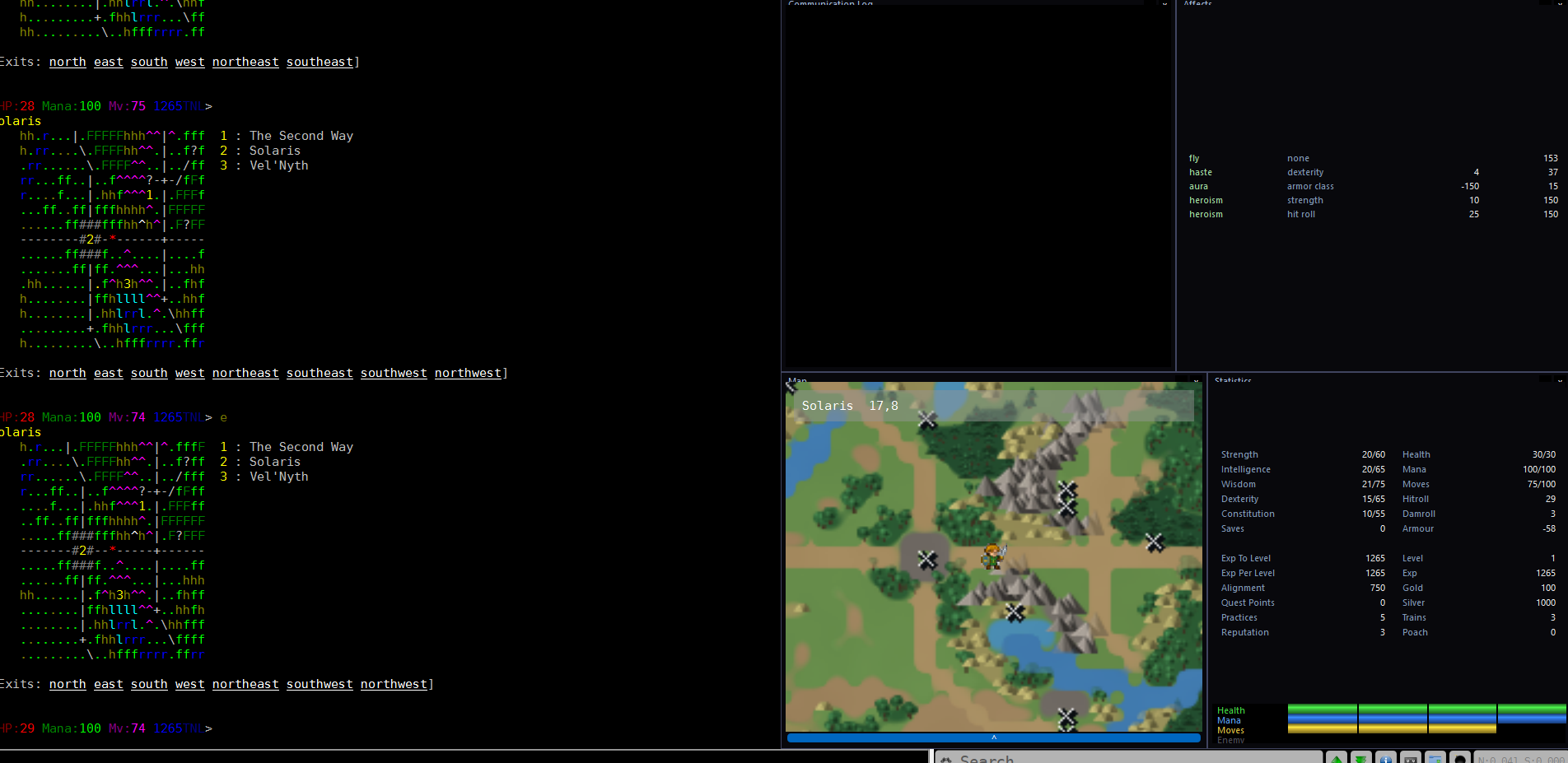
A Mudlet window running solarUI: the game's own text and ascii overworld down the left, and on the right a communication log, an affects panel, the painted map with the player on it, and a statistics panel above four coloured gauges.
solarUI running against a live game. The game's own output keeps the left half, overworld map and exits and all; on the right are the communication log and the affects panel across the top, the map below them, and the statistics panel above the health, mana, movement and enemy gauges. This character is standing in Solaris at square 17,8, which the map pane says along its top, and is carrying fly, haste, aura and two counts of heroism, which the affects panel is listing with what each one is worth.
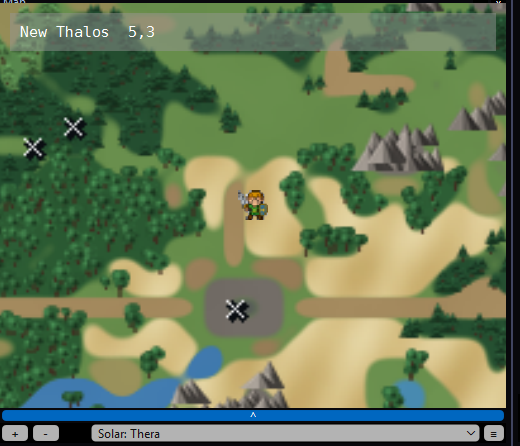
The solarUI painted map: a small figure standing on a sandy track through green country, trees and grey mountains around, water at the bottom, crosses marking three ways off the map, and a box at the top reading New Thalos 5,3.
The map pane close up — the painted map, which is what it shows once you are on the overworld. The figure is you. The crosses are ways off the map and into an area — they are not named, because at this size one name every few squares turns a map into an index. The box along the top gives the country and the square instead, and answers for whichever room the mouse is over rather than the one you are standing on.

Communication log

Every channel, in its own window, so a tell does not scroll away underneath a fight. The feed for this is one Mudlet's own supports list leaves out — the script asks for it explicitly, which is why the log fills where a stock profile's would stay dark.

Affects

The same rows the affects command prints, kept live: a duration under three turns red, and a permanent affect reads perm. Death link, singing and hiding are not affects and carry no duration, so they sit in a footer under the table rather than pretending to be rows in it.

The map

The pane knows where you are and changes with it. Indoors and in ordinary rooms it is Mudlet's own mapper, given a quadrant rather than a window you have to go looking for — and it fills in as you walk, a room at a time, working out which way you went from the exits the last room listed rather than from what you typed. Recall, a portal, a follow or a command that failed cannot send it the wrong way. Step onto the overworld and it becomes a painted map of Thera — the continent as a picture rather than a grid of letters, with your sprite standing on it and a cross on every way into an area. The info box names the country and the square you are on, Eastern Roads  14,10, rather than a room number nobody types; indoors it names the room and the area it is in. It stays one line, and it answers for whichever room the mouse is over, so you can read the name of a room you are not standing in.

The tile view is still there and lua solarPaintedMap() swaps between the two. It draws the same 25×15 grid of country the game draws, centred on you and running into the regions around you, in a tile font of the game's own: conifers for forest, waves for water, peaks for mountains, rounded swells for hills, courses of brick for a wall so you can see which way it runs, worn paving for the roads and laid planking for a pier or a boardwalk, its boards running across the way you walk — the roads turn corners and meet at junctions rather than breaking into a jagged run of bars and slashes. The sea comes ashore on a curve instead of down a staircase, because a square on the coast is drawn part water and part land rather than one or the other. You are a sprite standing on top of it all, filling exactly one square, and he turns to face the way you are walking — standing still keeps the way you last went rather than snapping back.

Take a ship out and the map goes with her. At the helm or on deck it draws from where the vessel is rather than where you are standing, and she takes your place on it — ship, submarine or airship, each with her own four facings, and each pointing the way she was last steered rather than the way she has drifted.

Your own hulls are drawn where you left them, on the square they are anchored on, so a ship you can step onto looks like one. Only yours — the map is not a fleet tracker and will not tell you where anybody else's is — and the one you are aboard is left off, because she is already the marker you are standing on.

Take a coach, a ferry or a turtle and the map does the travelling. It works its route a square at a time while you sit on it, so the country goes past under you rather than arriving as a wall of text, and the sprite on the map is the coach, the boat or the turtle you are on, pointed the way it is going.

Go underground and the picture goes with you. The caves are painted the way the continent is: ledges shaded so a shelf reads apart from the floor below it, falling water drawn in waves across the drop, bridges over the water, and a mouth where one chamber opens into the next. In a tunnel you are a silhouette rather than the figure you are out in the light, and where something crosses above you it is drawn over your marker — which is what tells you that you are under the span rather than on it. It is drawn as whatever is actually up there, so planking covers you over the water and stone covers you inside a castle.

Some things lying on the floor draw themselves on it. An item left where it lies shows on its own square, over the ground and under you, and it goes from the map the moment somebody picks it up — so a room can be read for what is still in it rather than looked at twice.

Where the ceiling comes down, you duck. Your sprite crouches for as long as the roof above your square is low, and stands again the moment it lifts — so you can see from the map alone whether it is safe to be where you are standing. Press a button and the map shows what it did: a bridge thrown across a gap is drawn where it now lies, and taken away again when it runs out.
Statistics and gauges

Your stats above four gauges: health, mana, movement and the enemy. Health changes colour as it falls — green from 67%, yellow from 34%, red below — and in a fight the enemy gauge shows the percentage as its label with your opponent's name inside the bar.

Every panel moves

Drag a title bar to move a panel, drag an edge to resize it, right-click the title for a menu that rolls it up, locks it or hides it. Mudlet remembers where you left each one, per profile, and puts it back next time. The defaults are the four quadrants of the right half.

lua solarReset() puts them all back, for when one has been dragged off the edge or buried under another and cannot be got hold of again.

Choosing which overworld map you get

lua solarPaintedMap() swaps between the painted map and the tile view, and lua solarPaintedMap(false) stays on the tiles.

On the painted map only the square you are standing on is drawn, because a trail of marks across the picture is a record nobody asked for. lua solarPaintedTrail(true) keeps them from then on.

A starter map of the Academy

On a fresh profile you are handed it. The package carries a ready-drawn map of the Solar Academy, and where your map is empty it loads itself as soon as the panels are up — eighty rooms from the off, rather than two squares and a mapper filling in behind you. You do not have to move for it, and you do not have to have installed it yourself: a profile handed the package on the way in gets it too. lua solarNewbieMap() asks for it by hand.

If a new profile's map stays blank, lua solarMapCheck() says what happened to the starter map and how many times it tried. An older package cannot report on a feature it does not have, so the line being missing altogether is itself the answer: install the package again from here.

On a map that already has rooms you can see it refuses, and that refusal is protecting you. Mudlet loads a map file by replacing the map, not by merging into it — so over a profile you have played it would take out every room you had walked, every area the overworld made, and anything you had drawn by hand. lua solarNewbieMap(true) overrides the refusal, and there is no way back from it.

Before you install

  1. Mudlet 4.8 or later

    The draggable panels are Mudlet's own Adjustable.Container, which arrived in 4.8. On anything older the script says so and stops rather than half-building an interface you would then have to unpick.

  2. Disable mudlet-base-ui if you have it

    It sets its own borders and lays out the same half of the window. Two things reserving the same strip is the one conflict that will make a mess.

  3. Leave GMCP on

    It is on by default and there is nothing else to configure. A Mudlet package cannot change profile preferences, so if you have turned GMCP off at some point it has to go back on by hand: Settings → General → Protocols. Without it the panels draw and stay empty.

If something goes wrong

The game window has disappeared

Click the profile tab first — it should come back on its own. Since 1.7 the repair is registered against Mudlet's profile-focus event, so switching to a profile whose output has been squeezed shut is enough to give it back.

If it has not, type this in the input line:

lua solarHeal()

Mudlet writes the border into the profile config, so it survives a restart and outlives the script that set it. Disabling the script does not bring the window back and neither does reopening the profile.

lua setBorderRight(0) is the older advice and still works — it is the first thing solarHeal does. What it does not do is remove the cause, which is why the border kept coming back.

A panel has gone missing

lua solarReset() puts every panel back where it started. Worth knowing that the saved geometry is keyed on each panel's name, so the reset is also what you want after upgrading if a panel comes back in a strange place.

The panels are there and empty

That is GMCP being off. See before you install — Settings → General → Protocols.

The map is spades and shading, not tiles

The tile font registers when the package installs, and a font does not reach a profile that is already running. Restart the profile and it will be there.

To ask what it settled on:

lua solarMapCheck()

It reports whether the font is registered, and what size a square came out at. Until the restart it says not registered — and the map drawn without it is still a map, the same shades and spades the game draws over telnet.

The map pane looks empty

lua solarMapCheck() says why. It reports how many rooms your map holds, how many of them are hidden, and for the room you are standing in: its area and coordinates, how many rooms share that area, and how many of those are drawn. It then prints five of the rooms by number, broken out into where each one came from — worth pasting if you are reporting a map that looks wrong.

Mudlet's mapper shows one area at a time, which is the answer people miss — a map with hundreds of rooms in it still draws almost nothing if the room you are in is the only one in its own area, and the pane can be centred on an area you are not in, in which case every count reads correctly and the screen is still blank. The check names the area the pane is actually showing, on the Mudlet versions that can be asked.

If it reports a lot of hidden rooms, they are old overworld squares. Up to version 1.40 the painted map left one behind for every square walked, out of sight, and enough of them would stop the Academy map loading. Nothing collects them any more, and lua solarForgetOverworld() clears out a profile that already has them. It touches only hidden rooms that are overworld squares, so anything you hid yourself is left alone.

If the map is drawn on the wrong squares — rooms piled on top of one another, or a picture stacked on a picture — lua solarForgetOverworld(true) takes the squares you can see as well as the hidden ones, and the overworld redraws itself as you walk. Installing 1.67 does it for you; the command is there for putting a profile right without waiting for an update. Rooms you walked indoors are left alone either way.

The panels are the wrong size after resizing Mudlet

The reserved strip is measured once rather than recomputed on every resize, on purpose. Re-measure it by hand:

lua solarRefit()

Every event reports a nil value

Only possible on a hand install: the script's name has to match the function it contains, capital letter included. Mudlet fires a registered event by looking up a global function named after the script, so solarUI the script calls solarUI the function, and a mismatch reports attempt to call a nil value on every event and nothing else. The package cannot get this wrong; a hand install can.

Installing by hand

If you would rather see exactly what you are putting in your profile, the package is only a convenience — the script is one Lua file and fifteen event names. A hand install does not get you the terrain map: that draws from the atlas and the tile font, which come in the package, and without them the pane falls back to Mudlet's own mapper everywhere. Everything else works.

  1. Add the script

    Scripts → Add Script, named exactly solarUI, and paste the file in.

  2. Register the events

    Under Add User Event, pressing Enter after each:

    gmcp.Char.Vitals · gmcp.Char.MaxStats · gmcp.Char.Stats · gmcp.Char.Status · gmcp.Char.Worth · gmcp.Char.Affects · gmcp.Comm.Channel · gmcp.Room.Info · sysConnectionEvent · sysWindowResizeEvent · sysInstallPackage · sysProfileFocusChangeEvent

  3. Save and restart the profile

    Save Script, then close and reopen the profile. The interface builds on the first message the game sends about your character rather than on connect, so the login banner stays readable.

The script lives in the game's own repository, beside the server code that produces the feed it reads — so a field added to the game and the panel that displays it are one change rather than two in different places.